BIM (Building Information Modeling) is one of the most important technologies in the AEC industry but unfortunately many companies still treat it as burden. Meanwhile with proper BIM automation your BIM-related processes can run smoothly and even improve your company's efficiency.
BIM automation is the use of scripts, plugins, integrations and dedicated software to automate repetitive tasks related to creating, updating, analyzing and managing BIM content and data. It can be used to automate workflows inside tools such as Autodesk Revit, but also to connect BIM with external systems and digital platforms. BIM automation helps reduce manual work, improve data consistency and speed up processes that would otherwise require repeated input from architects, engineers or BIM specialists. Depending on the use case, it can support both design workflows and the management and distribution of BIM content.
Which AEC companies are using BIM automation?
When speaking about BIM automation, we often think first about increasing productivity in architectural firms that use BIM in their design processes. However, automation can bring significant benefits to many other companies across the construction industry as well. Engineering firms, contractors, consultants and construction manufacturers can all automate tedious BIM-related tasks, improve data consistency and simplify collaboration between different project stakeholders.
Construction manufacturers, in particular, often outsource the creation of BIM files and digital models of their products so that architects and engineers can easily use them in their projects. However, creating these files is only the beginning. BIM content also needs to remain accurate and up to date as product specifications, parameters or available variants change. Automation can help manufacturers update BIM product files, manage their data and distribute the latest versions across BIM libraries, websites and other digital platforms.
In this blog post, we will focus on BIM automation for both architects and construction manufacturers.
Automated workflows in Autodesk Revit – BIM plugins
Revit plugins that introduce BIM automation are developed by both construction manufacturers and architectural offices. Although both use automation to improve BIM workflows, their goals and the types of processes they automate are often different.
Construction manufacturers
Manufacturers develop Revit add-ons to make it easier for architects and engineers to select, configure and use their products directly in BIM projects. Depending on the product or system, these tools can automate product configuration, verify whether selected components are compatible, perform calculations based on technical or regulatory requirements, generate Bills of Materials, or connect designing software with manufacturers’ internal systems. This helps designers work with products correctly while reducing the need to manually search through technical documentation or contact the manufacturer for support.
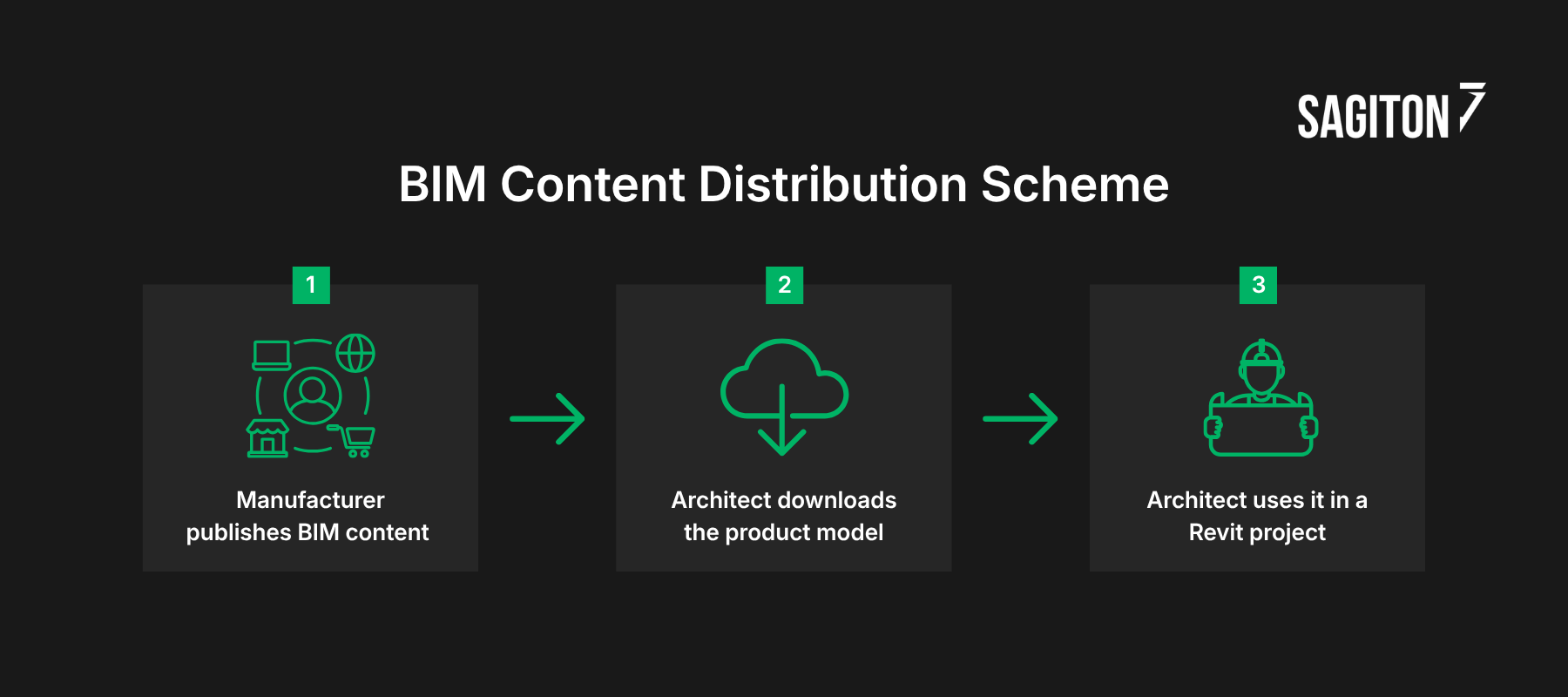
Example workflow Manufacturer publishes BIM content → Architect downloads the product model → Architect uses it in a Revit project → Revit plugin checks selected parameters and component compatibility → If an incorrect option is selected, the plugin suggests a valid configuration → Correct product system is used in the BIM model
Architectural and design offices use Revit automation tools mainly to reduce repetitive work and make internal design processes faster and more consistent. Automations can cover tasks such as creating and updating schedules, processing model data, generating documentation, modifying elements in bulk, or integrating Revit with spreadsheets and other non-BIM systems. Instead of manually repeating these operations after every model change, teams can automate them according to their own standards.
Example workflow Architect updates the Revit model → Add-in retrieves the latest model data → Data is automatically filtered, grouped and recalculated according to office standards → Schedules are updated → Reports are exported to Excel, PDF or an external system → Cost estimators, procurement teams or clients receive consistent, up-to-date information
While Revit add-ons are one of the most popular ways to implement BIM automation, they are not the only option. Other tools and workflows can also automate BIM processes, connect different systems and improve how project data is created, updated and exchanged.
Looking to implement BIM automation? Get in touch with us to schedule a free consultation with one of our specialists!
BIM automation reduces time-consuming tasks and helps both architects and construction manufacturers improve the way they create, manage and use BIM content. From tools like Dynamo used to automate Revit workflows to platforms for generative design and BIM content management, different solutions address different needs across the AEC industry. Below you will 3 examples of top BIM automation tools.
Streamlining BIM processes with Dynamo scripts
Dynamo is a visual programming environment commonly used with Autodesk Revit to automate tasks that would otherwise require repetitive manual work. Instead of writing traditional code from scratch, users can build a script by connecting visual nodes representing different operations, data inputs and actions performed on a BIM model. This makes Dynamo a relatively accessible BIM tool for architects, engineers and BIM specialists who want to introduce automation without developing a complete Revit plugin.
Dynamo scripts can be used for many types of BIM automation, including generating sheets, numbering elements, updating parameters, creating or modifying model components, and extracting information from Revit for quantity takeoffs or performance reports. It can also support workflows where data from a drawing, spreadsheet or another external source needs to be processed and transferred into a BIM environment.
One of this BIM software main advantages is flexibility. Because the logic of a workflow is visible and editable, BIM teams can create their own internal automations and adjust them as project requirements change. For processes used mainly inside an organization, a Dynamo script can also be a cost-effective alternative to developing a dedicated software add-on. It can significantly save time when the same model operations need to be performed repeatedly across many projects or product variants.
Case Study: Dynamo Automation for Habic Cluster
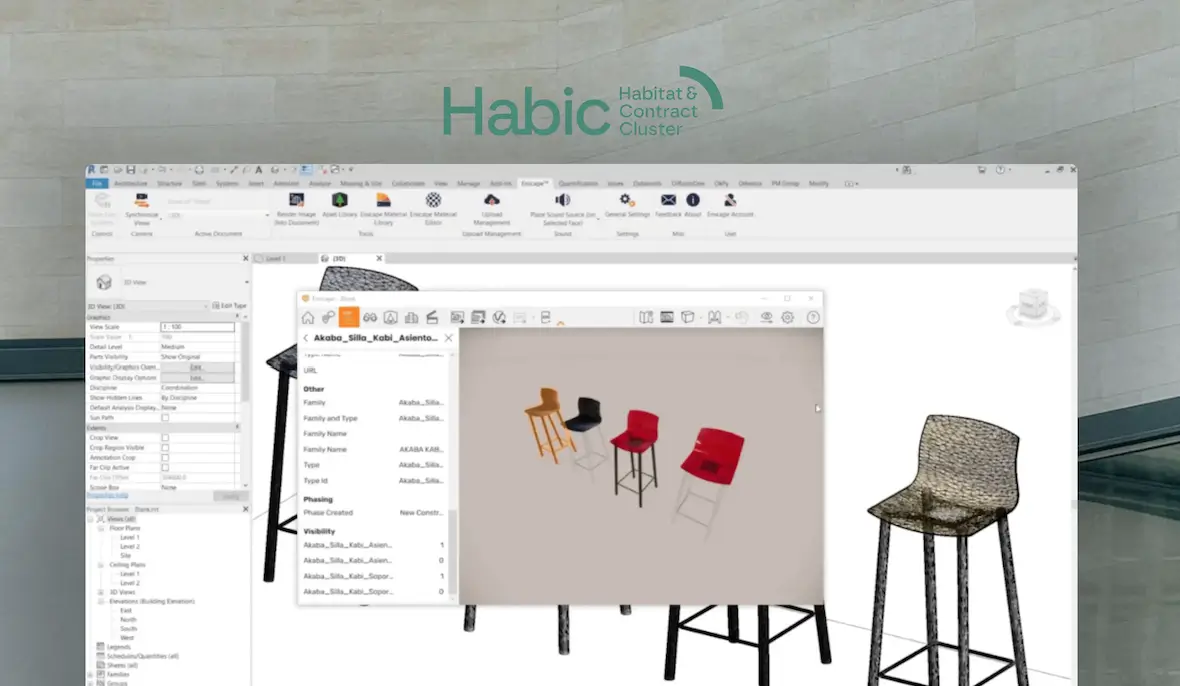
Habic is a cluster representing furniture, interior equipment and construction-product manufacturers from the Basque Country in Spain. The organization needed a more efficient way to create and manage BIM libraries for multiple manufacturers whose products often shared similar components but differed in configuration, materials or other parameters. Preparing every possible Revit model manually would have required significant repetitive work from the BIM team.
To streamline this process, we developed a BIM software containing configurator that automatically generates BIM by combining predefined, reusable product components. The script also included a user-friendly interface, so it could be used by people without expertise in Dynamo. As a result, Habic can now use BIM automation to create configurable product variants faster, save time on repetitive modeling, reduce the number of separate BIM files that need to be prepared, and reuse components across products from different manufacturers.
Hypar – Generative design with AI use
Generative design is an automated approach to creating and evaluating multiple design options based on predefined parameters, such as building requirements, materials, budget or site conditions. Instead of manually developing each variant, architects and engineers can use algorithms to quickly compare possible solutions and select the ones that best meet project goals. This helps reduce repetitive work, speed up early design stages and optimize costs or resource use.
Hypar is a cloud-based platform that applies this approach to AEC workflows. It allows users to generate and modify building models using reusable functions, predefined components and custom logic. By automating selected design tasks, Hypar can help teams create project variants faster and focus more time on engineering decisions rather than manual modeling.
CAD to BoM conversion tools
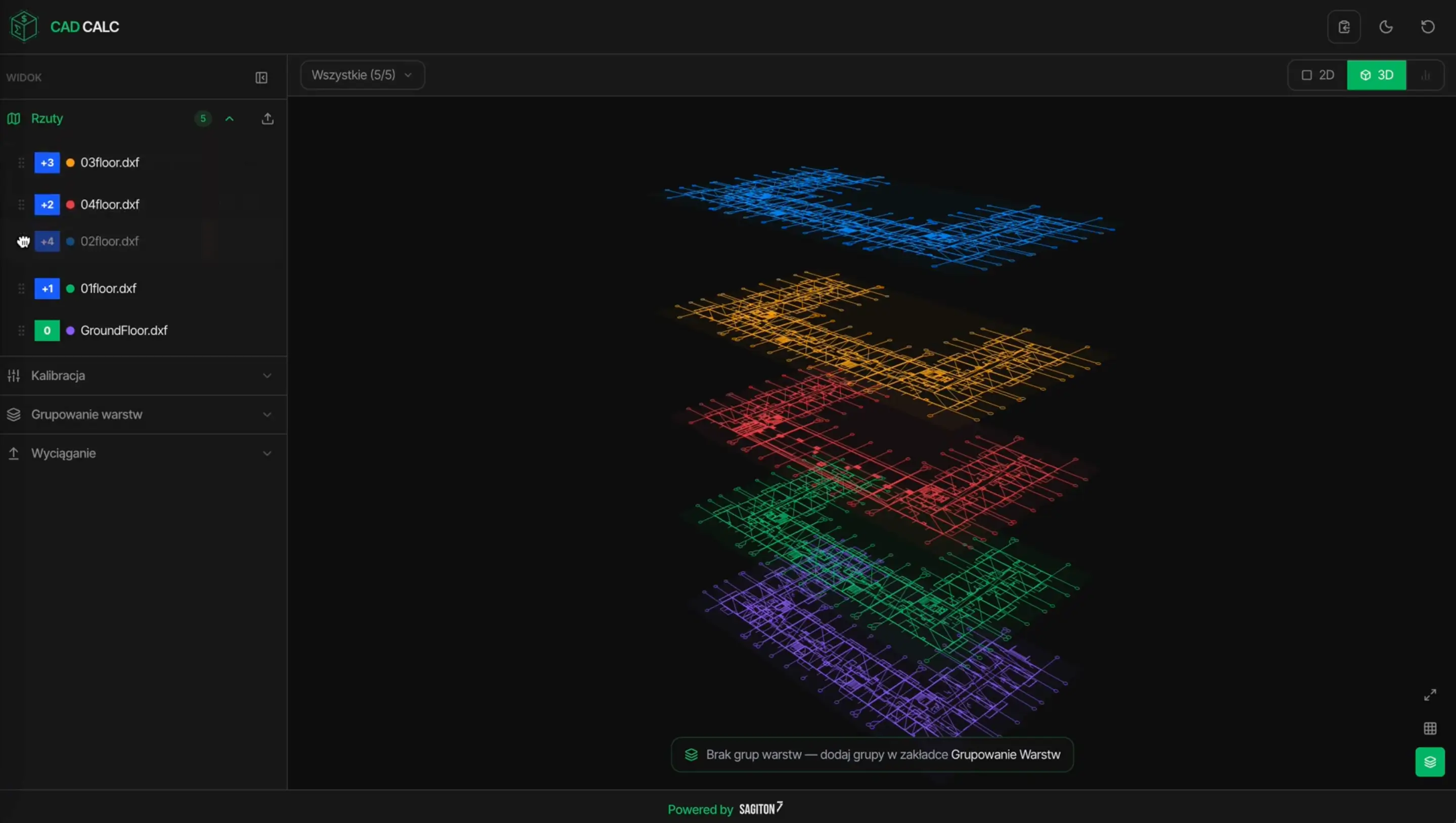
CAD-to-BoM conversion tools can automate the analysis of 2D CAD drawings and turn technical documentation into structured project data. These solutions can calibrate drawings, recognize and group layers, and identify which elements should be extracted from the project, for example walls, doors or other selected components. Depending on the workflow, they can also support the conversion of 2D drawings into simplified 3D models, reducing the amount of manual work required to prepare data for further BIM processes.
Example of CAD to BoM conversion tools – CADCalc by Sagiton
Once the relevant elements are identified, the software can automatically generate a Bill of Materials (BoM) with quantities and specifications based on the CAD data. This information can then be used to automate further quantity takeoffs, cost estimation and quotation processes, helping contractors, manufacturers and engineering teams move faster from technical drawings to procurement and pricing.
Automated BIM generation – BIMStreamer
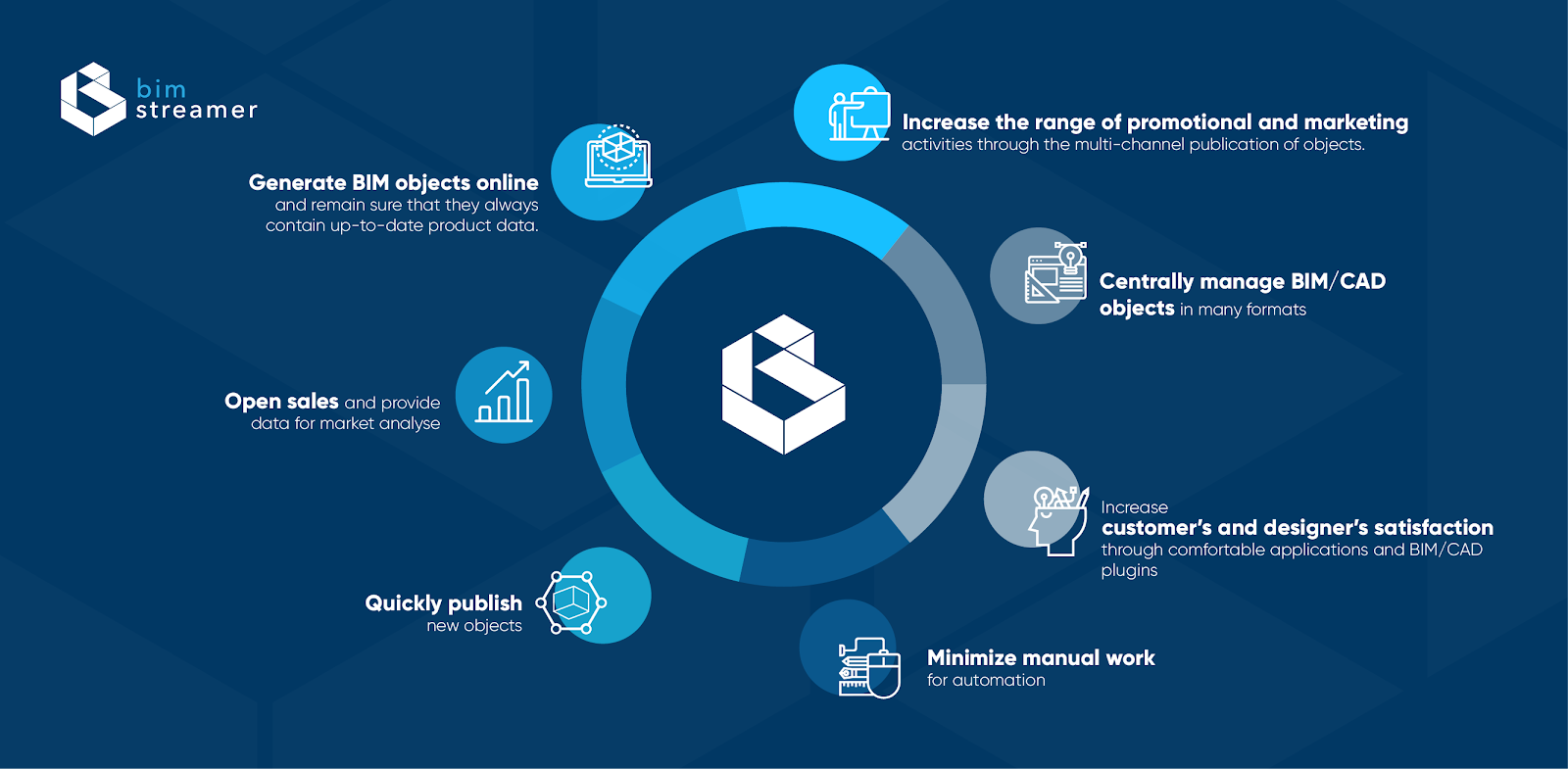
BIMStreamer is a BIM automation software designed for construction manufacturers that need to generate, manage and distribute BIM content across multiple digital channels. Instead of relying on repetitive manual processes, manufacturers can connect product information from systems such as PIM with their BIM libraries, allowing BIM data to be updated automatically whenever product specifications, parameters or available variants change.
The platform also gives manufacturers their own environment for hosting and managing BIM files. A BIM manager can control product content in one place, while BIMStreamer automatically synchronizes selected files and data across Revit plug-in, BIM platform, websites and other selected channels. This reduces the need to update the same content separately in every channel and makes omnichannel BIM management much easier to maintain.
This type of automation helps manufacturers avoid costly and error-prone manual updates while keeping BIM content consistent and up-to-date. Instead of spending time on routine file management and distribution, teams can focus on creating high-quality product data while BIMStreamer handles the repetitive work of updating and publishing it across selected channels.
What are the benefits of implementing BIM automation software?
BIM automation techniques can improve day-to-day work and give companies better control over complex BIM-related operations. The main benefits include:
Faster work for architects and other specialists – tasks that would otherwise need to be performed manually several times can be handled automatically, helping teams complete projects faster and spend more time on work that requires actual design or engineering decisions.
Fewer errors – rule-based automation can verify parameters, check selected elements and ensure that data follows predefined requirements. This reduces the risk of mistakes caused by manual input or overlooked project rules.
Better process control – automation software can provide clear logs showing what was executed, when it happened and whether the operation was completed correctly. This makes each operation easier to monitor, troubleshoot and improve over time.
If you want to streamline processes in the BIM area – contact us! Our developers specialized in BIM can help you reduce errors in your workflows.
Join our newsletter
Subscribe and receive additional content, checklists and business automation tips from us.
Thank you for subscribing to our newsletter!
You will soon receive a welcome message at the email address you provided.
Oops! Something went wrong, failed to send the form.
Automate your workflow with BIM technology – contact us!
Get in touch with us to book a free consultation with one of our specialists, who will show you how to optimize your company's processes.
Implementing AI in Business – How to Choose the Right Solutions? Practical Case Studies
AI-powered process automation enables companies to complete tasks more quickly and reduce daily operational costs. Learn what to consider to achieve your intended results.
Read more
Business automation
07.07.2026
data-and-business-decisions
Why do companies have data but fail to make decisions?
In this article, we will explore the topic of indecisiveness in businesses. You will learn, among other things, what information silos are and what to do to ensure that aggregated data truly supports sound business decisions.
Read more
E-commerce
05.08.2026
pim-alternatives
What can replace the PIM system? Discover an alternative to Pimcore, Akeneo, and Ergonode
PIM systems help companies organize product information, manage descriptions, images, attributes, and publish content across multiple marketing channels. However, ready-made solutions like Pimcore, Akeneo, or Ergonode aren't always the best fit – discover when and what to consider instead.
Read more
Contact us!
Select the topic you are interested in in the form and our specialist will contact you within 24 working hours.
Thank you for contacting us!
Your message has been successfully sent. We will reply as soon as possible.
Oops! Something went wrong, failed to send the form.



%20(1).jpg)