In this article, we demonstrate valuable Revit automations for architects to implement, helping to accelerate daily tasks, reduce the risk of errors, and improve model data management.
Why is Revit automation becoming increasingly important? Discover examples of improvements
Autodesk Revit is a fundamental tool for architects and BIM teams, but a project within this software is often just one component of a larger process. Design data needs to be exported, analyzed, transferred for cost estimation, cross-referenced with technical documentation, compared against standards, or integrated with the company's internal systems. When these tasks are performed manually, they increase the risk of errors and consume significant time and effort.
This is why Revit automation is becoming increasingly important for architectural and design offices. Well-designed plugins, scripts, integrations, and custom overlays can take over repetitive tasks, organize data, and support architects in their project work. In the following paragraphs, you'll find examples of Revit automation for design firms that can be tailored to your organization's individual needs and processes.
1. Integrating Revit with estimation and project management systems
One common application of Revit process automation is connecting this tool with other systems used in a design office. These might include applications for preparing quotes, managing orders, cost control, work planning, or project handling.
An example of such a solution is a plugin connecting Revit with an internal customer service system. This plugin can retrieve data directly from the project and transfer it to the tool where the company prepares proposals, schedules, or cost estimates. Instead of manually re-entering information about elements, areas, materials, or technical parameters, the team benefits from a single, streamlined data flow.
If designers in your company use multiple tools even for small projects, such a solution can help streamline communication. Data flows faster to the appropriate systems, is more consistent, and the risk of errors from manual information copying significantly decreases.
2. Automatic conversion of data from Revit models to other tools
In many organizations, data from Revit models must also be used outside the design environment. This data can be sent to web applications, ERP systems, databases, analytical tools, configurators, or internal reporting platforms.
A good example is the automatic retrieval of equipment data from models and exporting it to a clean, standardized JSON format. This format can then be read by the company's internal systems. Instead of manually creating spreadsheets, organizing columns, and correcting field names, architects can hand over their work to a dedicated tool that can perform the entire conversion automatically, according to predefined rules. Additionally, it's possible to implement automated parameter mapping, data completeness validation, or file generation in the structure required by other tools. This ensures that information from Revit is always ready for further use.
3. Automating repetitive design tasks
A significant portion of daily work in Revit involves tasks that are repeated across many projects. This might include placing elements, copying layouts, creating variants, filling in parameters, checking annotations, or preparing simple material calculations.
Custom Revit overlays can significantly speed up such tasks. A dedicated plugin can assist in automatically placing elements according to specified rules, copying repetitive layouts between rooms, or generating variants based on selected parameters.
Such tools do not replace conceptual work, but they relieve the team where decisions have already been made and only repetitive operations remain. This allows more time to be dedicated to analysis, coordination, and refining design solutions.
Are you looking for a way to speed up design in your architectural office? Schedule a meeting with our specialist and find out what you can gain with automation in Revit!
Schedules of materials, areas, equipment, or installations are essential in design work. Revit allows their creation using native functions, but in many offices, simply compiling data from the model is not enough. Information often needs to be further filtered, grouped, names adjusted, values recalculated, or prepared in a format required by cost estimators, the investor, or other tools used within the company.
In such cases, it's possible to implement a Revit add-in that retrieves data from the model, organizes it according to office standards, and exports it to the appropriate format, such as PDF, Excel, or a structure required by an external system. The tool can also perform additional operations not covered by standard scheduling, such as dividing elements into groups, calculating quantities for orders, preparing data for cost estimation, or creating reports according to a defined template.
This means the team doesn't have to manually correct schedules after every model change. The data is consistent, easier to control, and ready for use by those responsible for design, cost estimation, procurement, implementation, or client contact.
5. Model Verification for Standards and Formal Requirements
In design offices, compliance with standards, formal requirements, BIM standards, and internal modeling rules is of great importance. Manual verification of such elements is possible, but for larger projects, it becomes overly demanding.
Properly implemented BIM automation can check whether selected products, elements, or parameters meet specific requirements. It can analyze data completeness, compliance with standards, classification correctness, required BIM parameters, naming conventions, family types, or rules applied in your design office.
Such a tool allows for faster detection of errors and inconsistencies even before moving to the next project stage. It reduces the risk of costly revisions, supports the work of BIM coordinators, and helps maintain a consistent model standard throughout the organization.
6. Integration of Non-BIM Documents with Revit
Not all data required in the design process resides within the BIM model. Some information comes from DWG files, PDFs, technical descriptions, material specifications, tables, scans, or documentation provided by the investor. While Revit itself allows using such files as underlays or reference materials, the greatest business value comes not just from linking them to the project, but from automatically processing the data they contain. It is precisely in this area that the integration of non-BIM documents with Revit can be particularly useful.
For example, an automated process can analyze DWG files for areas, annotations, layers, elements, or material schedules, and then compare this information with data available in the Revit model. Similarly, the system can read data from PDF documents, technical specifications, tables, or investor documentation and use it to verify the model, prepare reports, supplement parameters, or generate a list of materials and components.
Such automation can support more complex processes, such as facade documentation analysis, material requirement recognition, load checking, or the preparation of design and cost recommendations. Based on this, the tool can generate a price offer, a BOM (Bill of Materials), a list of components, and detail drawings using the company's DWG library. As a result, non-BIM documents cease to be merely reference material and become a source of data that can be utilized in an organized design process.
7. AI Assistant Supporting Work with Revit Projects
Another direction for Revit automation could be the implementation of an AI assistant that supports architects and BIM teams in analyzing design data. Such a tool can utilize not only information stored in the model but also technical documentation, descriptions, specifications, PDF files, DWG files, and company product libraries.
In practice, a user can ask questions about a specific project, and the assistant responds based on the actual context. It can help check what elements are in a given area, which products have been used, what components can be utilized as substitutes, or whether a particular solution complies with the documentation.
The AI assistant can also support the detection of inconsistencies, missing parameters, or dependencies requiring verification, such as the proximity of installations or discrepancies between the model and technical descriptions. This allows the team to find necessary information more quickly and transition more efficiently from project analysis to preparing recommendations, schedules, or proposals.
Case Study: Revit Automation for Habic's BIM Teams Using Dynamo
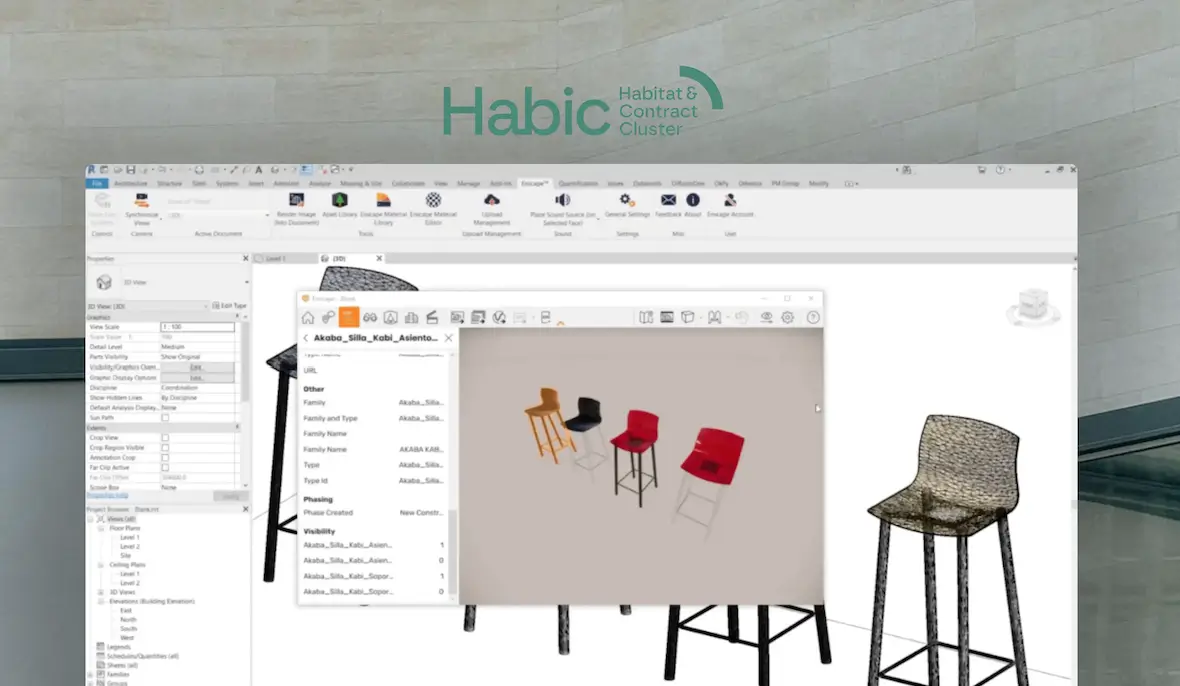
To show you the benefits that Revit automation can bring (this time in conjunction with Dynamo technology), we will describe an example of our implementation for Habic. Habic is a cluster from the Basque Country in Spain that brings together manufacturers of furniture, interior design elements, and accessories for the construction and interior design industries. The organization supports companies operating in European markets in developing their design, production, and sales processes.
Client's Challenge
Companies associated with Habic had many CAD files, but increasingly needed to work with BIM libraries as well. Manually preparing successive product variants was time-consuming, inflexible, and hindered quick responses to client needs. The client therefore needed a solution that would allow for the automatic generation of BIM models based on repeatable components, and for changing selected parameters such as color, material, element type, or product configuration, without having to create each version from scratch.
Solution
We developed a Dynamo-based automation for Revit. The script allows for creating models from pre-made components and adapting them to selected parameters. The solution was supplemented with a simple interface, making it accessible even to users who don't work with Dynamo daily.
For architectural firms, this example shows that Dynamo can be used not only for simple data organization scripts but also for building more advanced tools supporting model work, variant generation, element configuration, and BIM automation.
Benefits
The implemented solution reduced the time required to prepare BIM libraries and minimized manual work when creating subsequent object variants. The client gained a more flexible workflow, allowing the same components to be used repeatedly in various configurations. Our project for Habic is an example of creating a customized Revit tool that addresses the specific needs of an organization.
Automation in Revit as a Competitive Edge for Architectural Firms
As you can probably see, Revit process automation allows architectural and design firms to work faster, more accurately, and more predictably. Integrations with internal systems, data export, report generation, model verification, or documentation preparation can significantly lighten the load on project teams.
The greatest potential lies in processes that are repeated across many projects and involve numerous people. It is precisely there that well-designed automation tools yield the most visible results: less manual work, fewer errors, better data quality, and faster information flow between architects, BIM Managers, cost estimators, and project managers.
If your firm uses Revit but still performs many tasks manually, it's worth checking which ones can be automated. Dedicated solutions for architects and BIM teams can become a practical way to scale operations, improve project quality, and build a competitive advantage.
Join our newsletter
Subscribe and receive additional content, checklists and business automation tips from us.
Thank you for subscribing to our newsletter!
You will soon receive a welcome message at the email address you provided.
Oops! Something went wrong, failed to send the form.
Want to automate tasks in Revit?
Contact us and schedule a free consultation with our specialist to get a quote for your project.
How to block scammers? Protect Your Service Company from Fake Invoices
You run a service business, and your customers pay their invoices on a regular basis. The processes run smoothly until one day the client reports that he has paid into an account that... does not belong to the company. Invoice fraud? Unfortunately, such situations happen in reality. As experts in automating business processes and configuring secure servers, we'll show you how to protect your business from fake invoices — from the simplest schemes to the most sophisticated. We present four scenarios and practical solutions that will protect your finances.
Read more
Business automation
07.07.2026
company-savings-with-automation
How much can you save in your business in 2026 with process automation?
All the companies around you, including your competition, have already started to automate, and you still don't know if it pays off at all? Read our article and find out how much you can really save by automating your business — an article written based on real data from our projects.
Artificial intelligence (AI) promises to revolutionize business — from implementing process automation to precise forecasting. However, reality often deviates from expectations. Read our article and learn about 5 real examples of the difficulties that organizations face when implementing AI.
Read more
Contact us!
Select the topic you are interested in in the form and our specialist will contact you within 24 working hours.
Thank you for contacting us!
Your message has been successfully sent. We will reply as soon as possible.
Oops! Something went wrong, failed to send the form.



.webp)