An electronic document management system is a platform where company documents are created and processed in a digital format. More and more companies are choosing this way of working because electronic documents are simply easier to manage. This is further simplified by the fact that we can now use various types of electronic signatures, making the digital version the only legally binding version of a document.
Implementing a document management system does not mean that all documentation must be converted to electronic format immediately; most companies choose to phase out paper documents gradually.
Because documentation no longer needs to be printed, we can automate various processes related to creating, signing, or delivering documents. We wrote more about which document workflow automations are worth implementing in our article "Automation of electronic document flow in a company", which we recommend reading as an introduction to this article. In today's piece, however, we will focus on slightly more advanced document management automations powered by artificial intelligence.
Why should you use AI in document management systems?
In business, there is increasing talk of IDP, or Intelligent Document Processing, which involves managing documents using AI. While typical automated document management can save many hours of work on tasks leading up to the creation and signing of a document, AI allows us to implement various workflow improvements for documents that are already finished. Artificial intelligence allows not only for very fast, automatic analysis of file content but also for data extraction, evaluation, reviewing, and creating summaries. It is worth using these "skills" of the technology for more advanced tasks that we would not have been able to automate just a few years ago. And those are exactly what we will discuss in this article.
4 ways to use artificial intelligence for document management
The possibilities for using AI in a document management system go beyond reading data from files or creating short summaries. Properly implemented solutions can analyze the content of documents, recognize their meaning, trigger subsequent process stages, and even point out potential issues to users.
Below, we present 4 examples of using artificial intelligence for document management that can streamline daily work in a company.
Automatic document categorization
One of the primary applications of AI is the automatic categorization of documents entering the system. In simple document automation solutions, contracts or invoices are assigned to appropriate categories based on predefined rules – for example, the presence of a specific word in the filename. If it contains the term "Invoice", the document can be automatically forwarded to the accounting department.
AI allows us to go a step further. Instead of analyzing only the document name or individual keywords, it can take into account the content and context. This allows it to recognize what the document is actually about and, based on that, decide which category it should fall into or who should handle it.
For example, AI can distinguish an invoice for IT equipment from a document related to office supply purchases. The former can be routed for approval by the IT department, while the latter goes to the person responsible for office administration. Such a solution reduces the need for manual document sorting and allows subsequent stages of the document workflow to be triggered faster.
AI assistants that answer questions about document content
If a company's documentation is stored in a single system, it can also be used as a knowledge base for an AI assistant. Instead of manually browsing through multiple files in search of specific information, a user can ask a question in natural language and receive an answer prepared based on the stored documents.
An employee can, for example, ask about the notice period specified in a contract with a specific supplier, the expiration date of an insurance policy, or warranty terms defined in an order. A properly configured assistant will not only provide the answer but also indicate the document from which the information was sourced, so the user can verify the relevant entry themselves. This is a so-called human-in-the-loop mechanism, which leaves the human in control of the process despite the use of AI.
This solution significantly reduces the time required to search for information. Instead of checking folder after folder and file after file, the employee gets access to the necessary data almost instantly. As a result, the use of AI assistants increases the efficiency of working with documentation, especially in companies that process hundreds or thousands of files every day.
Looking to build an AI-powered document processing system for your business? Book a free consultation with our process automation specialist!
The next step is to use data from documents to automatically trigger actions in other systems used by the company. By integrating with project, task, or process management software, automation can recognize information within a document and create relevant tasks based on it.
The simplest example is an invoice with a specific payment deadline. Once the document is read, AI technology can immediately create a "Pay invoice" task on the accounting department's board, assign it to the appropriate person, and set a deadline matching the payment date indicated in the document.
A similar mechanism can be used in other industries and processes. The system does not have to react only to dates or specific fields. Thanks to context analysis, it can also recognize information written in plain text. For example, if a client asks in an order for a cost-benefit analysis of an additional solution, AI can automatically create a corresponding task for a salesperson or consultant. In this way, automation eliminates human errors caused by forgetting to perform a certain task.
Thanks to artificial intelligence, a document is no longer just a file stored in a system; it can become a trigger for subsequent actions throughout the entire business process.
Context analysis and automatic suggestions
As part of effective management, an AI-powered document workflow system can continuously analyze new files, compare the information within them against other documents, and flag potential inconsistencies. In such cases, AI supports the user not only when they ask a specific question but also works "in the background," even when the employee is not actively reviewing documents at that moment.
Imagine a client contract that sets a maximum project value of EUR 10 000. The first order is worth EUR 7 000, and the next is EUR 3 500. Each of these documents analyzed separately might look correct, but only by considering the broader context can one notice that the total value of the orders exceeds the limit specified in the contract.
The system can detect such a situation and display automatic suggestions to the employee before the document is approved or the process moves to the next stage. Similarly, it can catch discrepancies in deadlines, prices, terms of cooperation, or other arrangements found in related documents.
These types of mechanisms ensure that AI is not used solely for faster information retrieval. It can also actively help control processes and signal situations requiring employee attention well in advance.
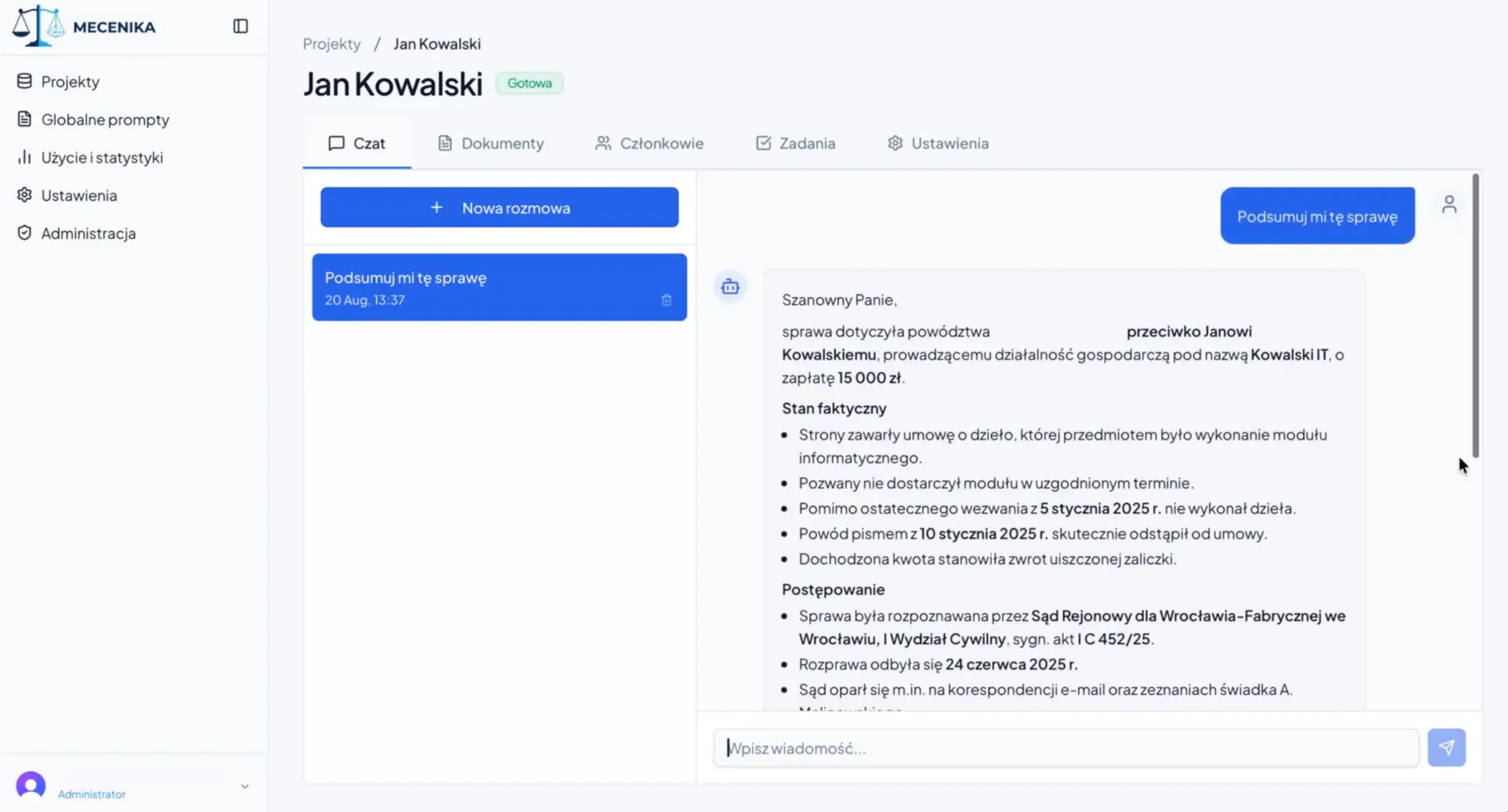
Case study: Mecenika – AI legal assistant for document processing
A few months ago, a law firm approached us wanting to implement a legal document management system. The company was primarily looking for a solution that would allow for the rapid processing of information from various types of contracts and applications, without tedious manual document review. Currently, lawyers spend most of their time simply reading and finding necessary information instead of making key decisions. Such automation of law firm operations would therefore aim to increase our client's operational efficiency by eliminating these manual processes.
To demonstrate the possibilities of business process automation to the client, we created an intelligent system that enables:
Aggregating all documents in one database – to enable artificial intelligence to analyze information from documents, we created a file database where users can upload new records with just a few clicks.
Querying the AI assistant for key information – thanks to automated document data processing, AI answers user questions (asked via a dedicated chatbot) in seconds.
Automatic task creation for lawyers – the firm also struggled with quickly assigning tasks related to document processing, so we created an automated task creation system that takes into account contractual agreements and internal company deadlines.
AI-powered task prioritization – to further optimize the client service process, we also decided to use artificial intelligence to prioritize the tasks created.
AI legal assistant for document analysis
How did we secure data access in the AI document management system?
We also ensured security and data processing compliance within the solution. User interaction with the AI is additionally monitored by a bot that acts as a security filter and controls access to information.
The system also utilizes a private AI context, meaning client data is not shared with the AI service provider. Furthermore, sensitive information is filtered based on the user's role and permission level, ensuring that each person only accesses the data they need. This is complemented by access level management and 2FA login, supporting the security and organizational compliance of the solution.
Automation and AI in document management – when to implement
Automating document management with AI is worth considering especially when employees spend a total of more than 50 hours a month searching for, analyzing, and transcribing information from documents. The more time a company spends on such repetitive tasks, the greater the potential for savings and the faster the return on investment.
Assuming the total cost of an hour of a specialist's work is approximately 20 EUR gross, reducing 50 hours of work per month represents a potential saving of EUR 1000 per month. The cost of implementing a simple system of this type starts at around EUR 2500, which means that under these assumptions, the investment can pay for itself in about 2.5 months. If a company spends more than 50 hours a month working with documents, this period can be even shorter.
It is worth remembering that the benefit is not just time savings. Such automation can also increase the accuracy of document work, speed up access to information, and allow specialists to focus on tasks that truly require their knowledge and experience.
If you want to implement an AI-based document management system, contact us! At Sagiton, we help our clients' companies streamline document workflows using AI!
Join our newsletter
Subscribe and receive additional content, checklists and business automation tips from us.
Thank you for subscribing to our newsletter!
You will soon receive a welcome message at the email address you provided.
Oops! Something went wrong, failed to send the form.
Looking to implement document automation in your company? Get in touch with us
Visit our contact page and fill out the contact form, and one of our specialists will get in touch to schedule your free online consultation.
Is your customer service team not keeping up with current tasks? Read our article and learn how customer service automation enables companies to process requests faster and reduce the time to respond to inquiries.
Read more
Business automation
06.07.2026
where-to-start-automation-of-business-processes
Business Process Automation in your Company — where to start?
Business process automation is a topic that is gaining importance among entrepreneurs who want to increase work efficiency. Read the article and learn how business process automation can help your team with everyday tasks.
Read more
Customer service
07.07.2026
implementing-voicebot-in-the-company
Is it worth implementing an AI Voicebot in your company?
AI Voicebots can significantly relieve the burden on your customer service team, speed up repetitive processes, and improve your company's accessibility to customers. Discover how phone call automation works and when such a solution truly makes sense.
Read more
Contact us!
Select the topic you are interested in in the form and our specialist will contact you within 24 working hours.
Thank you for contacting us!
Your message has been successfully sent. We will reply as soon as possible.
Oops! Something went wrong, failed to send the form.



.webp)

-p-1600.webp)